Roo Code is among the first wave of autonomous coding agents built directly into the IDE. Here’s a first look at AI-powered application development with Roo and Gemini inside VS Code.

It already seems like I’ve been waiting too long for the AI coding tool I’m looking for; one that lets me go from idea to app, then keep refining as I go. I want a tool that lets me stay firmly in the realm of ideas while my application changes are magically manifested by generative AI. It’s not that I don’t want to get my hands dirty in code; it’s just that we were promised this. We’ve been told developers will soon be obsolete, so I think, “prove it.” Show me a tool that lets me develop apps in an ongoing way without needing to understand what’s going on. No more, “it’s coming soon.” Show me a tool I can use right now.
Getting started with Roo Code
Roo Code is a kind of agentic mediary for your AI engine. It uses the contents of your app and the resulting outputs, along with your prompts, to send requests to the AI engine, then applies your changes directly to the app.
To start using Roo Code, you have to provide an AI API for it to talk to. Since I have Gemini already, I used that:
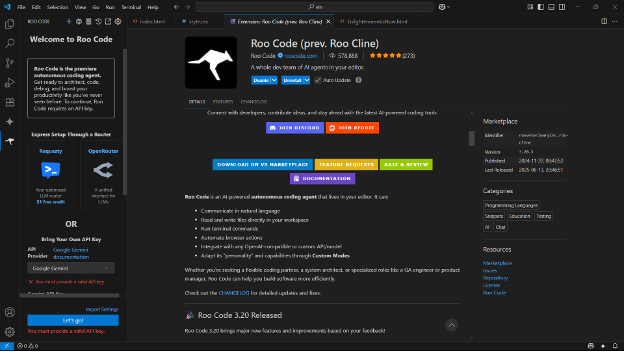
Selecting Gemini in the Roo Code GUI.
Matthew Tyson
Note: While Roo Code is free, you’ll pay for API calls to your provider at whatever rate it charges.
Setting up Roo Code in the terminal
One of Roo Code’s powers is that it runs commands directly in the terminal. I had to fiddle with the terminal defaults to get the console commands working properly. I’m on Windows and had Git Bash as my terminal in VS Code. I kept getting errors whenever Roo went to run commands, so I switched to PowerShell and ran a permission command as described here. That resolved the errors.
Managing agency in Roo Code
The current generation of AI assistants like Roo Code (also see Kiro) are built to deliver agency, and the current approach to that leads to an emphasis on diffing files. In a way, diffing is the perfect intermediate step between AI coding assistants and fully agentic AI. We’ve surely seen the limits of cut-and-paste from the AI interface into the IDE—that is just painful.
A proposed diff of changes in the documents within the IDE has several benefits. It allows the AI to showcase its strength in manipulating text tokens; provides a logical point of human-in-the-loop interaction (developers approve proposed changes); and bumps up the level of agency in the interaction, because AI modifies files in place. In that sense, AI is taking action on the project.
If you enable automatic diff approval, you enter a more agentic mode, where you make requests and the agent reviews the required tasks and just does them. Roo has several auto-approval settings, as shown here:

Matthew Tyson
Mode approval allows Roo to switch between modes, primarily code and architect. In code mode, Roo just modifies code, whereas in architect mode it puts on its thinking cap for higher-level decisions.
Example app: My Music Gear
I asked Roo Code to give me an application for selling music gear. It offered a functioning application built from vanilla CSS/JavaScript/HTML on the front end and Node/Express/SQLite on the back end. By comparison, when I recently asked for a similar non-specific task from Google Firebase Studio, it gave me an app built on Next.js. Both are reasonable stacks to start from.
Roo Code in the data layer
I had a long conversation with Roo Code’s architect mode about databases. When I created the My Music Gear app, It started out by using SQLite, a dev-time default choice for the Node back end. This made sense because Roo could just use an integrated database instance inside the application.
When I asked about production options, the Roo Code architect suggested several. One was MongoDB, which is one of my favorites, so I used that to explore the boundaries of Roo Code’s agentic powers. Roo happily installed the MDB driver and swapped out the back-end code to use it, and migrated the queries to MongoDB. I gladly gave over all that grunt work to the AI.
Running a Mongo instance was a different story; since it was outside the app, Roo Code said I’d have to do that part for myself.
This gets into an interesting area of activity for agents: modifying the system itself and running more ambitious commands. Something like running wget to download a mongo package and install and configure it for dev-time use is a lot of agency for an an AI assistant. It gets into authentication and authorization, which are inevitably touchy areas.
The next step would be letting the agent provision assets like MongoDB Atlas or other cloud deployments and tie the app to them for development, testing, and production. Each of these steps evokes an increasing web of ramifications. It seems like agentic AI will eventually have a legitimate role in all of them, but it’s going to be a delicate balance to maintain, especially when it comes to secure auth and spend.
Maybe we’ll see different agents for different areas of focus, where the Roo Codes of the world do their part and then infrastructure orchestration AIs handle other areas of expertise.
Fortunately, when I decided to switch back from MongoDB to SQLite, Roo Code was able to execute it for me. That kind of exploratory change is a total buzzkill during manual development.
Automatic diffing
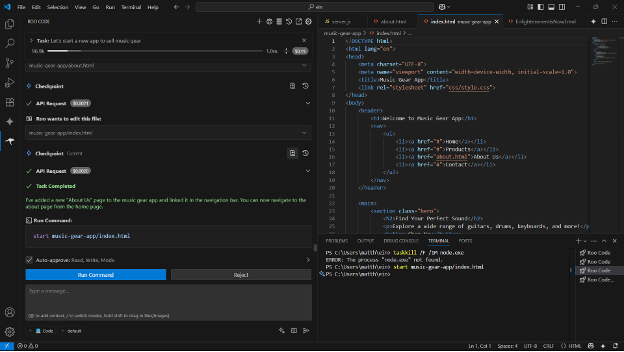
If you set the read and write permissions to true, the diffing process happens automatically. Many of your application updates will happen without intervention. You can still look at the changesets, though, as each step that would have triggered an allow question gives you access to the diff that occurred:
Matthew Tyson
Adding an about page
Next, I asked Roo Code to add an “About us” page to the app:
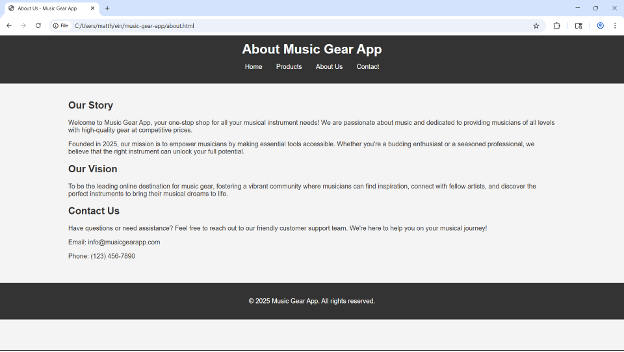
Requesting an About page from Roo Code.
Matthew Tyson
That worked fine; Roo delivered a perfectly reasonable template that I used to fill in the details for my About page. Again, this is just the kind of legwork that I want an agent to do.
Adding a payment gateway
Setting up a payments process had similar constraints as the database, in that Roo Code was able to help set up the parts in the app, but the integration work of creating a Stripe (or similar) account and obtaining API keys and testing it out were on me.
In the weeds with Roo Code
Next, I wanted to try something a bit more complex but still entirely within the application domain. I asked Roo Code to implement an admin page where I could add new items for sale to the database. Roo produced a reasonable input form at admin.html, but when I went to submit a new “Anti Gravity Guitar” item, it threw the error shown here:
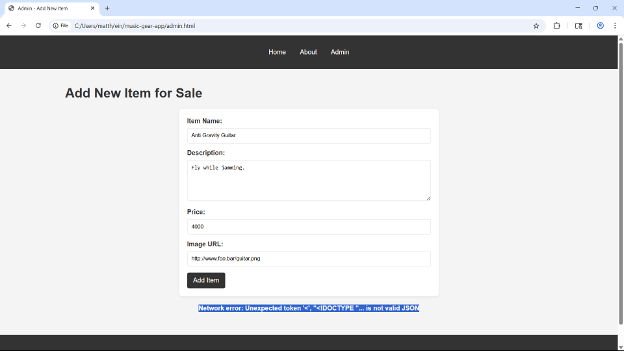
Error when submitting a new item via the Admin page.
Matthew Tyson
This error message informs me it’s not JSON and shows a snippet of HTML, a classic symptom of submitting a form to a JSON endpoint. I tell Roo Code about the error, and it says I need to restart the back-end server, which it can’t do because it’s running in a separate terminal. That’s strange because I didn’t start it; Roo Code did.
At this point, I’m grateful I’m an actual developer who understands the different parts of an application and how they’re supposed to work.
I tell Roo Code I don’t see any process running in the terminal, and it comes up with a complex PowerShell command to kill and start the Node process. This launches a separate window, and it seems to have worked, but now the form submit gives a “failed to fetch” error and the products no longer load. What’s more, if I go to localhost:3000, there’s nothing there, so the back-end server must be down. I tell Roo Code about this, and it makes another attempt to launch the back end, this time just running the node command in the server directory, inside the VS Code terminal.
That attempt hangs, but I go in there and kill it, then restart, and the back end is up and running again. But there are still errors when submitting a new item. Then I spot an SQLite error on the server console:
<anonymous_script>:0


[Error: SQLITE_ERROR: table products has no column named description
Emitted 'error' event on Statement instance at:
] {
  errno: 1,
  code: 'SQLITE_ERROR'
}
That error has killed off the server process, and now Roo Code offers me the following command:
Stop-Process -Id (Get-NetTCPConnection -LocalPort 3000).OwningProcess -Force -ErrorAction SilentlyContinue; rm music-gear-backend/musicgear.db -ErrorAction SilentlyContinue; Start-Process node -ArgumentList server.js -WorkingDirectory music-gear-backend
I look at the command and think, “What on earth is that?” So, I ask Roo Code what to do. It tells me the solution is to drop the SQLite table so it’ll be recreated. Does that seem reasonable? Possibly. I let Roo Code run it, and here comes another error:
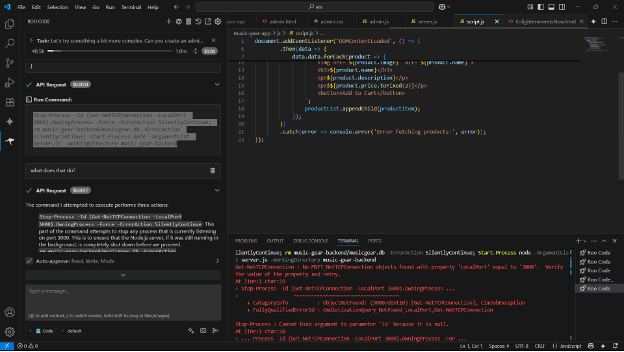
Another error message in the Roo Code GUI.
Matthew Tyson
It turns out, Roo Code bundled the Node launch in there, too. So, even though the SQLite command failed, it launched the back end again—this time in a separate window process outside of VS Code.
To Roo’s credit, it observes and comments on the error in the console (it tells me not to worry about it, the key being the application is restarted with a fresh schema). This is a key facet of real agency, in terms of being able to consume the outputs of the application.
So, it seems we’re off in the weeds a bit. I’m starting to think about putting on my coder hat and digging into this thing so I can understand it, rather than going around and around in circles. But then I give the app one more reload and see that item creation is working. Excellent!
Adding authorization
I want to push things a bit further and ask for authentication and authorization on the admin page, where only logged in users with appropriate access can add new items. I put in my prompts, and Roo Code comes up with a plan, including installing bcrypt, hashing passwords, making the schema changes, and adding the login page and auth checks. That’s all work I’m happy to offload, so I let it run. Roo Code makes the changes, and while it’s still very barebones, it works.
All of that would have taken quite a while to do by hand. Having agentic AI directly in the IDE, instead of orchestrating with a separate AI window or piecemeal at the file-level with code snippets, is a next-level degree of power.
Changing the text stack
I asked Roo Code about converting my prototype to a Next.js app for deployment to Vercel. It put together an action plan including the following “mermaid diagram”:
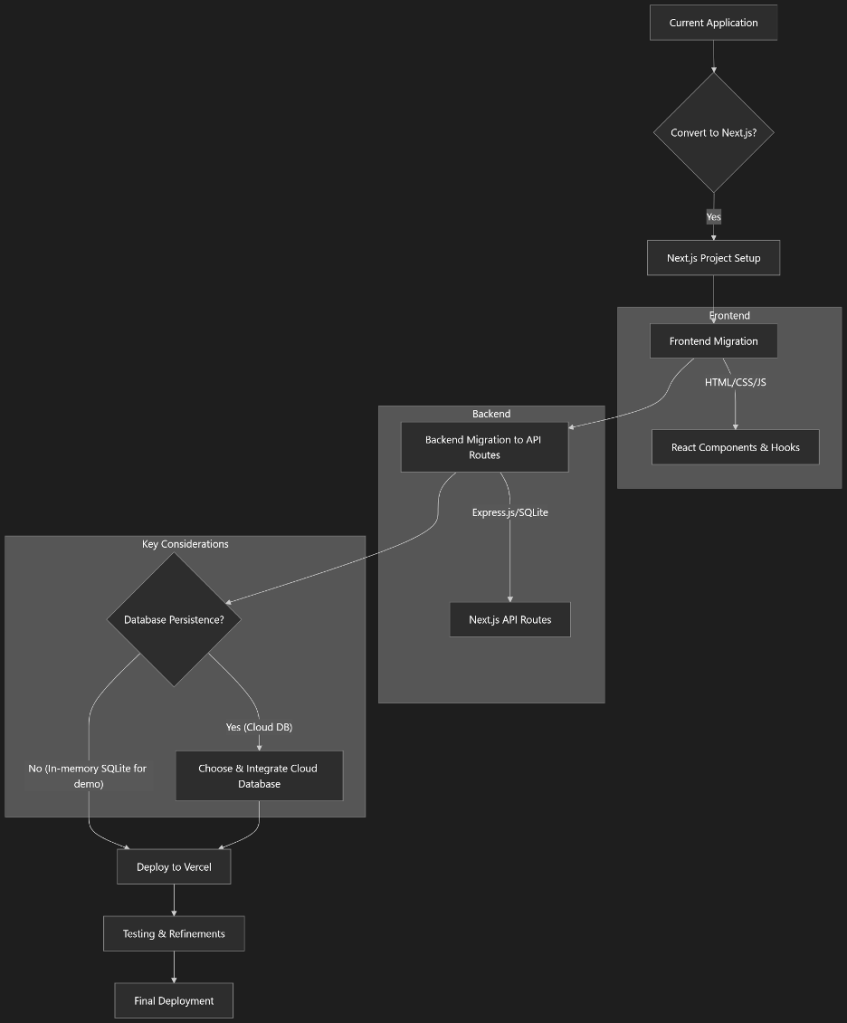
Roo Code’s plan for switching the application stack to Next.js.
Matthew Tyson
General impressions of Roo Code
As we’ve seen, Roo Code mostly flows along nicely, but sometimes it gets hung up. It will bog down and take a long time on some tasks. It stalled a few times, and I had to retry the task. Once, it crashed entirely, and I had to restart VS Code.
I also got into a little nitpicky area of UI refinement at one point. It was comical because I was trying to get two buttons to not clash in color with the main theme colors, and Roo Code kept switching out the two buttons. I was writing a review, but in a real coding situation, all of this would have been frustrating.
In general, getting into the fine points of the UI can be painstaking, with lots of back-and-forth interaction. The AI will fix one thing, then regress another. At times, I started to feel like going into the CSS myself might be quicker. This is an area where the idea of “GUI grounded AI”—that is, agents that can visually interface with the UI via computer vision—will be worthwhile.
The present and future state of agentic AI
Roo Code paired with Gemini inside VS Code is the most effective setup I’ve found yet for delivering on agentic promise. That said, the claim that agentic AI will replace rather than augment an actual human programmer is still improbable. Roo Code is more like a developer exo suit than an autonomous robot.
As a cautious real-world developer—one who’s been bitten by spiraling complexity time and again—I am wary of the amount of uninspected code being added to our codebases. A responsible developer will slow down, turn off the read/write auto-approval, and look more deeply at the diffs. They’ll take the time to absorb and understand the meaning of the proposed changes and adjust where needed.
What’s dangerous is the temptation to see AI-generated code that looks more or less okay, and just keep rolling. That’s okay for the early stages of prototyping, but we still need experienced developers in the loop during the later stages.
One wonders, though: Where is the logical conclusion of all this? Will a day come when I can sit back and say: “Okay, AI, build me an application that earns me two million dollars a year. Deploy it however you think is best. And then you can deposit the Bitcoin currency into my virtual wallet …”
Things can get pretty science-fiction-y if you let your speculation run.