
Google’s AI coding assistant can help you write, test, debug, and document your code, but currently lacks whole-repo code generation and agents for long-running coding tasks.

Given that Microsoft/GitHub/Azure and Amazon/AWS offer AI coding assistants, namely GitHub Copilot and Amazon Q Developer, which work as add-ins to Visual Studio Code and other IDEs, it was inevitable that Google/GCP would introduce one of its own. Gemini Code Assist performs code completions as you write your code, generates full functions or code blocks from comments, generates unit tests, and can help with debugging, understanding, and documenting your code.
Gemini Code Assist provides source citations, and will warn you about code that quotes a source at length; it may reference an applicable source code license if one is known. Code Assist offers a chat assistant as well as in-line assistance and completions within your code editor. Google doesn’t use your data to train its models without your permission, and indemnifies you against copyright claims that might arise from code it generates.
Gemini Code Assist’s large language models (LLMs) are trained on publicly available code, Google Cloud-specific material, and other relevant technical information in addition to the data sets used to train the Gemini foundation models. In an IDE, Gemini Code Assist gathers contextual information from the file that you’re actively using as well as other open and relevant local files in your project. Code customization, an Enterprise edition feature, lets you get code suggestions based on your organization’s private code base.
Gemini Code Assist is available via plugins for Visual Studio Code and JetBrains IDEs. It competes with GitHub Copilot, Amazon Q Developer, Sourcegraph Cody, Tabnine, Zencoder, Codeium, CodeGeeX, Replit Ghostwriter, Devin AI, Cursor, Zed, JetBrains AI Assistant, and Solver. It also competes with generative AI models that have been trained on code, whether or not they are integrated with code editors, because at this point some of them can generate whole functions or even whole applications, with varying abilities to generate correct code.
IDG
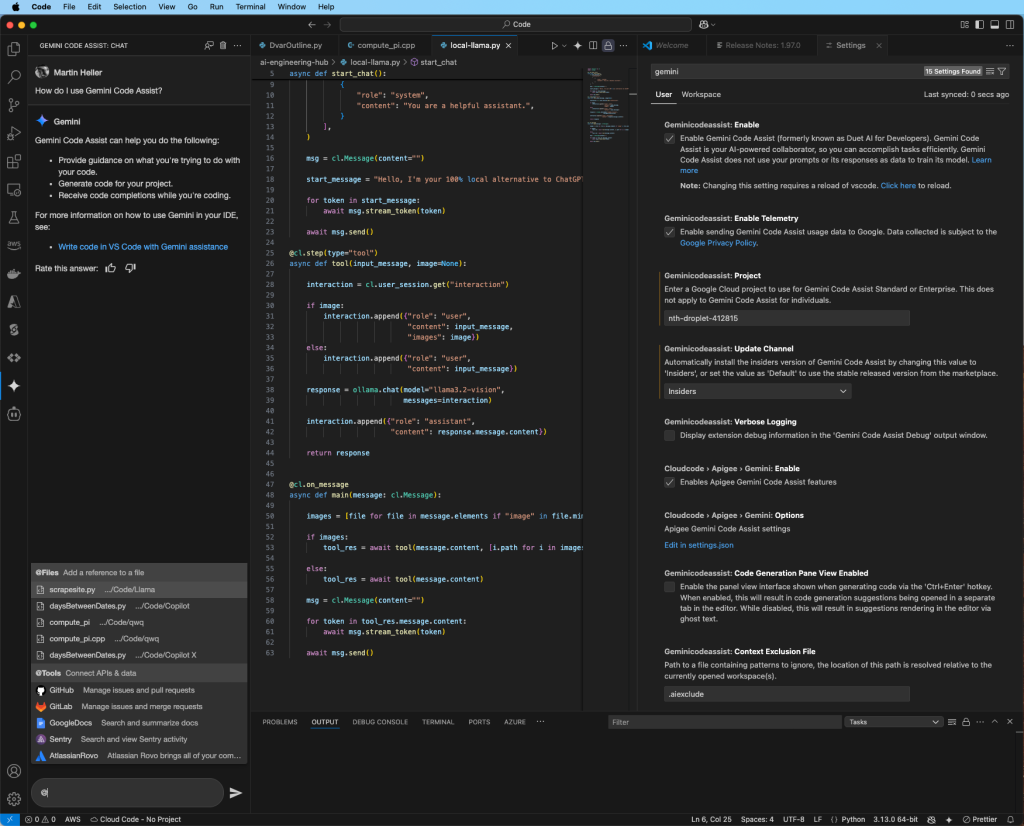
In the left-hand column of the screenshot above, you can see a Gemini Code Assist chat, with general instructions at the top and a pop-up file and tools reference list at the bottom. At the middle, you can see some code editors. At the right, you can see some of the settings for Gemini Code Assist.
Coding with Gemini Code Assist
Gemini Code Assist can help you write code and unit tests, and also help you debug, explain, and document your code. In the screenshots below, you can see how I used Gemini Code Assist in Visual Studio Code to help with tasks for C++ and Python programs. I restricted my prompt testing to my native English. Gemini Code Assist can handle prompts in almost 30 languages, from Arabic to Vietnamese.
IDG
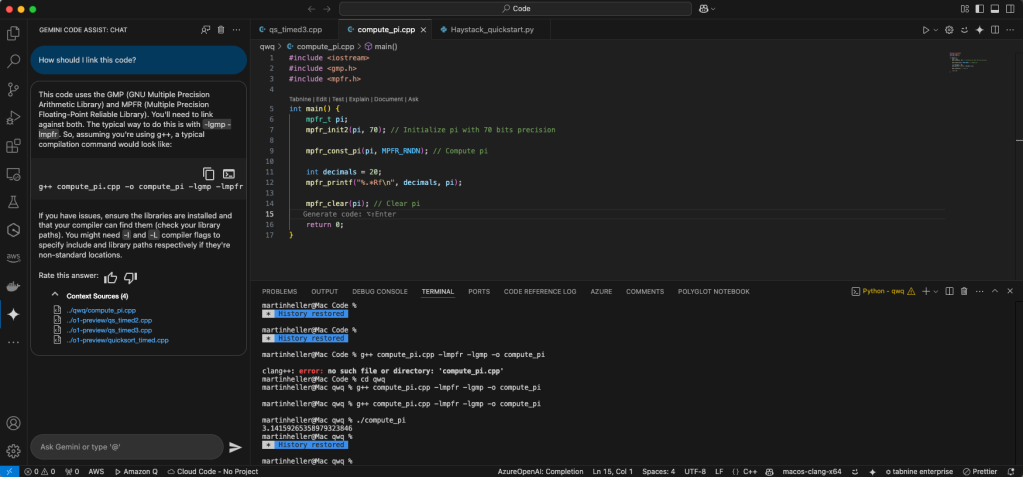
At the left above, you can see a Gemini Code Assist chat where Gemini explains how to compile and link the C++ code at the top right. I previously generated this code with the help of another model, QwQ. At the bottom right, you can see the code built and run. The value of pi computed is correct to 20 decimal places. I checked it against the 39-place value given in the Encyclopedia Britannica.
IDG
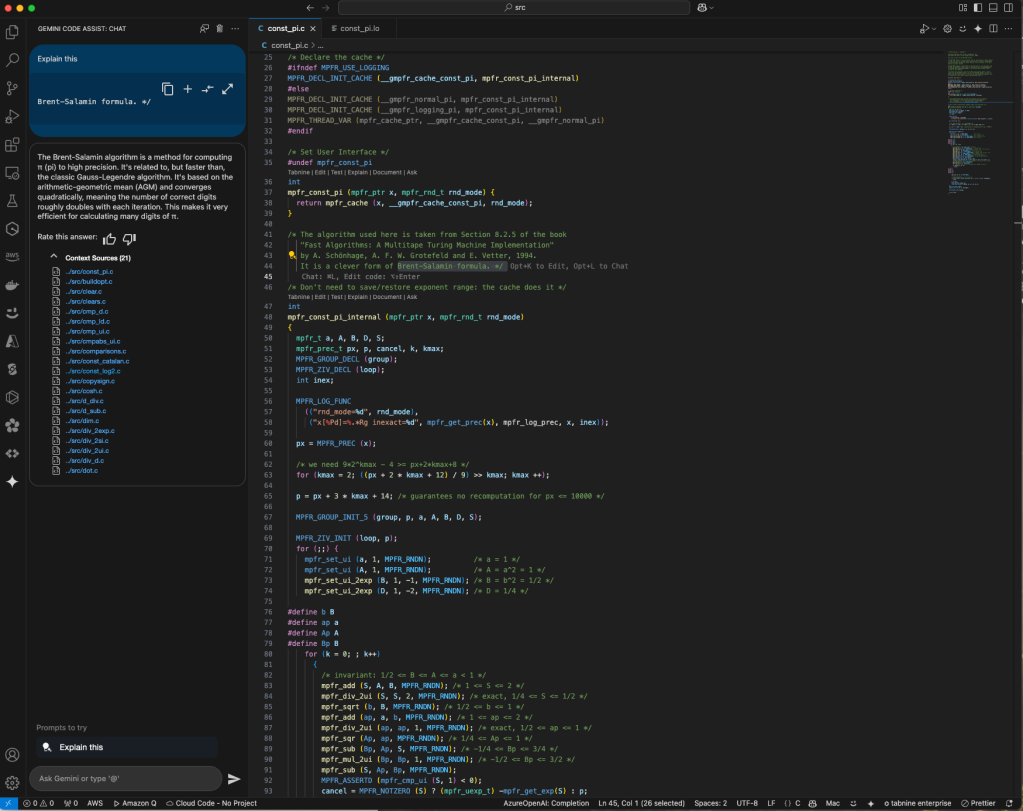
I looked at the source code for the high-precision floating point routine used to calculate pi. It referenced the Brent-Salamin formula, so I highlighted that phrase, right-clicked, and sent it to the Gemini Code Assist chat (left pane above). Gemini told me that it’s based on the arithmetic geometric mean (correct), and more accurate than the Gauss-Legendre algorithm (not correct; they’re equivalent). The math is discussed at the Wolfram site, among others.

IDG
I used Gemini Code Assist to help me expand the C++ program to calculate pi to a user-specified number of digits, i.e. compute_pi <precision>. It was a multi-step interactive process in which I wrote comments; let Gemini generate code; deleted leftover code that Gemini didn’t notice but would have broken the program; accepted flagged generated code with an unknown license because I thought it was too obvious to violate copyright; and asked Gemini to fix several undefined-variable errors even though I knew how, out of sheer laziness. I eventually wound up with a working and efficient program. Notice the dynamic calculation of the bits required in line 23 above.
IDG
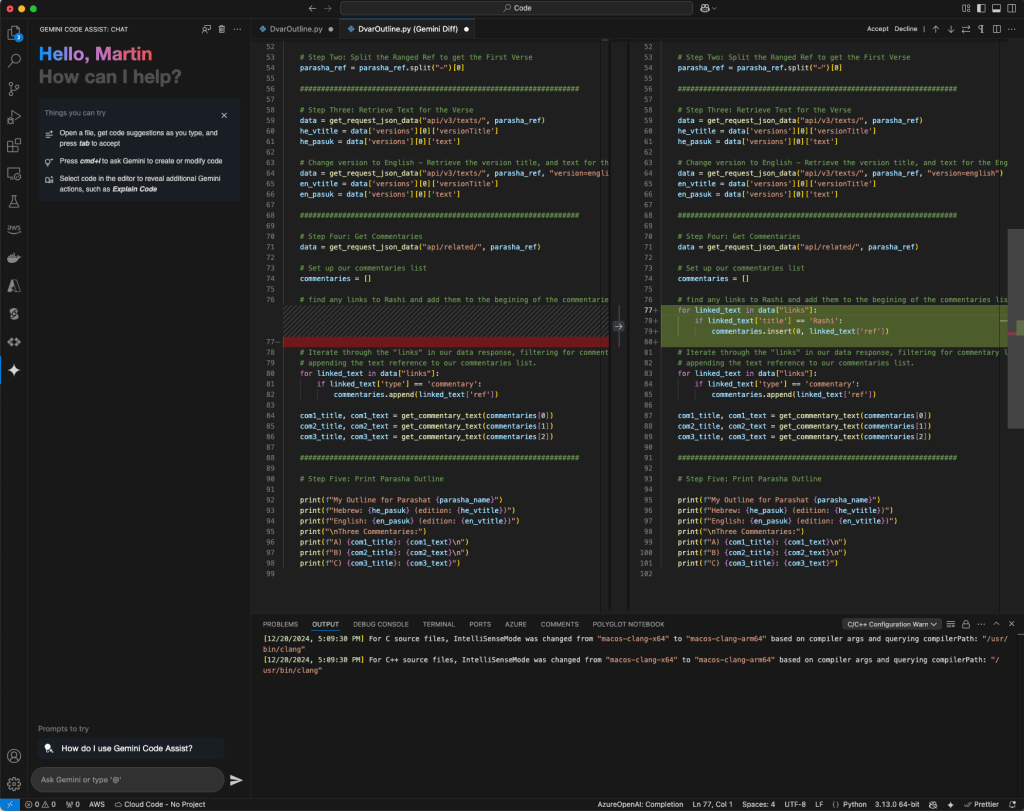
The sample Python code for the Sefaria API wasn’t quite to my liking, so I wrote a comment and asked Gemini Code Assist to implement it. The first version of my comment wasn’t specific enough, and I declined Gemini’s suggestion. After I clarified my comment, Gemini did a better job, as you can see in the green diff block at the right above.
IDG
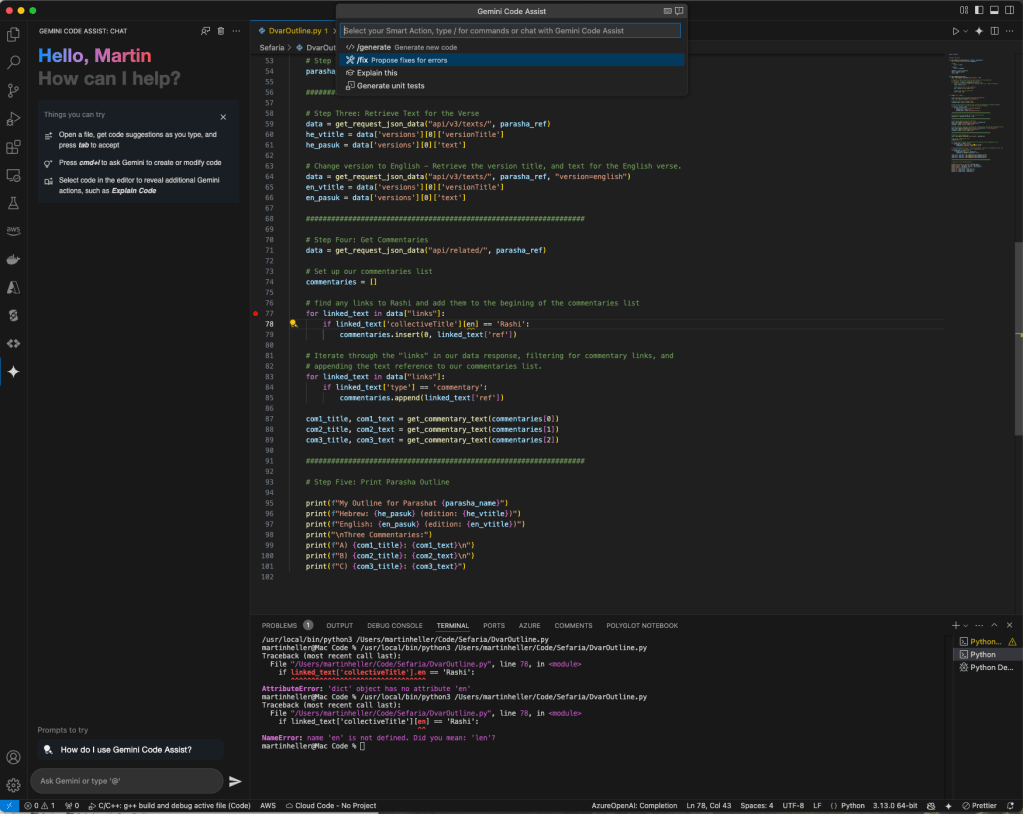
I accepted Gemini’s revised code, but it didn’t do what I wanted. I took a guess based on the API documentation, but when I tried to run it, I got an exception as you can see at the bottom right and at line 76.
IDG
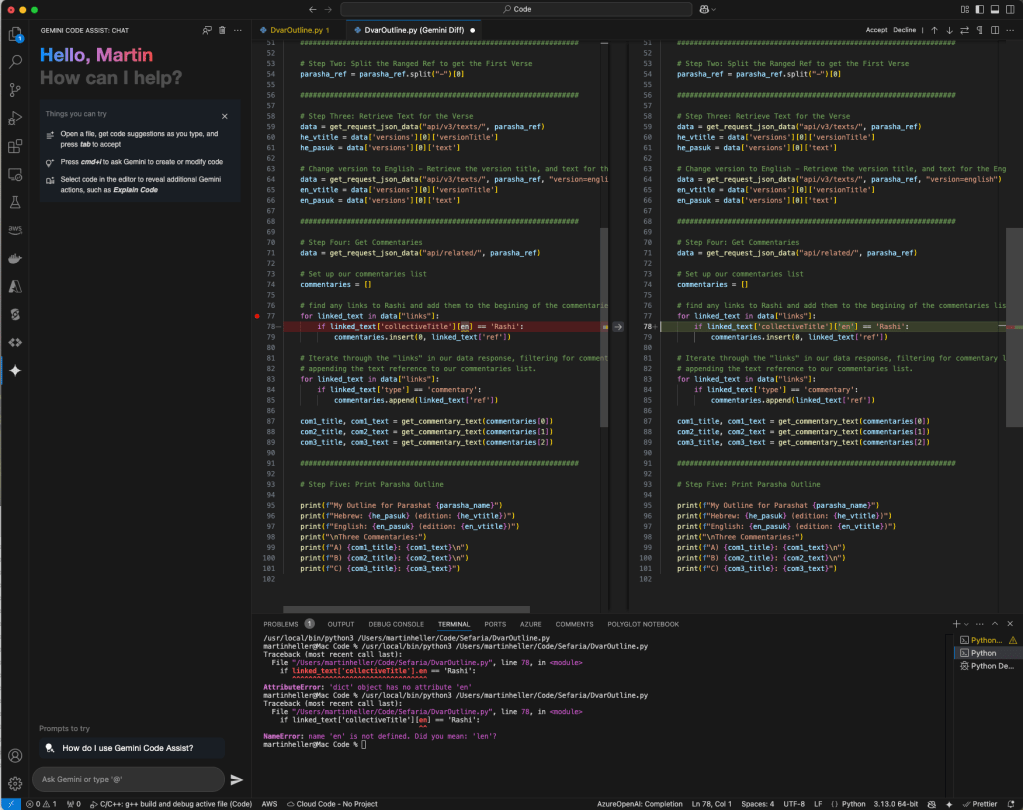
I asked Gemini to fix this bug, because the fix wasn’t jumping out at me. When I saw Gemini’s fix, I smacked myself on the forehead, as it should have been obvious.

IDG
That worked just fine, as you can see at the bottom right above.

IDG
Once the new code was working, I asked Gemini Code Assist to explain the whole file, as shown above.
In the course of doing these tests, I noticed that Gemini Code Assist is a little slower to respond in chat than some of the older OpenAI models used by GitHub Copilot. That’s because Code Assist uses a heavyweight model in chat that emphasizes accuracy over speed. It uses a more responsive model in the edit window, currently based on Gemini 2 Flash.
I also noticed that Gemini Code Assist chat doesn’t seem to go off the rails as often as some of its competitors, although it doesn’t narrate its “chain of thought,” like some models tuned for complex reasoning tasks can, for example the open-source Alibaba QwQ model and the new DeepSeek R1. Code Assist does say what context it used, at least in the chat window, and you can specify context when you make the query, either by selecting code in the editor or calling it out with an “@“ command.
Gemini Code Assist IDE integrations and programming language support
Gemini Code Assist has fairly extensive programming language support. It was trained on a “vast set of coding examples within the public domain,” and then verified for 22 common programming languages, scripting languages, and query languages: Bash, C, C++, C#, Dart, Go, GoogleSQL, Java, JavaScript, Kotlin, Lua, MatLab, PHP, Python, R, Ruby, Rust, Scala, SQL, Swift, TypeScript, and YAML.
In addition to supporting Visual Studio Code and JetBrains IDEs, Gemini Code Assist is available by default in Google’s Cloud Shell Editor, Cloud Workstations, and Cloud Code. Cloud Code, free for all Google Cloud users, provides IDE support for the full development cycle of Kubernetes and Cloud Run applications. Code Assist can assist with the Google Cloud CLI and Kubernetes Resource Model (KRM), both infrastructure-as-code interfaces. It is also available in Firebase, Google databases, and Colab Enterprise.
Gemini Code Assist Enterprise supports Code Customization, and is available in BigQuery, Apigee, and Google Application Integration. Code Customization is especially useful in large programming shops that have their own coding standards and ways of doing things. If you need to switch code customizations for various projects and/or customers, it’s fairly simple.
Gemini Code Assist Tools allow you to avoid switching to other environments from your IDE to do common programming-related tasks, such as referring to code in shared repos or specifications in Google Docs. So far there are tools for accessing Atlassian (Rovo), GitHub, GitLab, Google Docs, and Sentry. There are promises of future integrations with observability vendors Dynatrace, Harness, and New Relic; security vendors SonarQube, Snyk, and Black Duck; and database vendors Aiven, DataStax, Elastic, MongoDB, Neo4j, Redis, and SingleStore. Both Amazon Q Developer and GitHub Copilot have similar integrations.
Gemini Code Assist vs. the competition
Overall, Gemini Code Assist does a good job as a coding assistant. As long as you know what you’re doing as a developer and always review, test, and debug its code, it’s worth using. Remember that no large language model is 100% reliable and trustworthy, and always check what it says.
If you’re a Google Cloud programmer, using Gemini Code Assist rather than GitHub Copilot or Amazon Q Developer makes sense. You can also combine multiple code assistant plug-ins in one IDE, although it’s sometimes easy to become confused about which assistant is offering suggestions if you allow more than one to auto-suggest in the editor. It is possible to manage more than one using the context menu and separate chat tabs, but you might not want to pay for more than one.
When I began this review, Gemini Code Assist had no free tier. Given that Microsoft and AWS do have free tiers for their AI coding assistants, I suspected that Google would follow suit. Indeed, Google announced a public preview of a free version of Code Assist just as this article was being published. At the same time, Google unveiled a public preview of Gemini Code Assist for GitHub, a free AI agent that provides code reviews for public and private repositories.
Right now, Gemini Code Assist lacks multi-file and whole-repository code generation, and lacks agents for long-running coding tasks. Whether you want those features is a matter of preference. Some senior programmers prefer to restrict AI to small, easily reviewed tasks, because unscrambling a large change that introduces bugs can be more work than making the change correctly by hand.
Gemini Code Assist’s competitors have some of these features. GitHub Copilot Workspace and Solver, for example, offer repo-wide coding. GitHub Copilot Edits can make multi-file changes. And Amazon Q Developer has an agent for code transformation. Can Google be far behind?
Bottom Line
Overall, Gemini Code Assist does a good job as a coding assistant. As long as you know what you’re doing as a developer and always review, test, and debug its code, it’s worth using.
Pros
- Performs code completions as you write your code
- Generates full functions or code blocks from comments
- Generates unit tests
- Helps with debugging, understanding, and documenting your code
Cons
- Doesn’t support multi-file or repo-wide edits
- No agents for long-running coding tasks
- No command-line support outside of the Google Cloud
Cost
Gemini Code Assist for individuals, free (limit of 180,000 code completions per month). Standard Edition: $19 per user per month with an upfront annual commitment. Enterprise Edition: $45 per user per month with an upfront annual commitment. See https://cloud.google.com/products/gemini/pricing for a feature comparison.
Platform
Visual Studio Code, JetBrains IDEs, Cloud Workstations, and Cloud Shell Editor


