
If you avoid the gotchas and keep a close eye on resource consumption, you can have a useful server in the Amazon cloud for free

The best way to think of the free tier to Amazon Web Services is as a stepping-stone. It allows you to get your feet wet with the basic mechanisms of AWS and EC2; to understand Amazon’s handling of virtual machine instances, storage, data, and networking; and to create an item that can eventually be hosted on a full-blown, for-pay AWS instance. It also lets you learn how to manage and constrain AWS usage. If you’re not careful, you may end up paying for your “free” AWS usage after all.
In this article, we’ll look at what the free tier offers and on what terms, then take a closer peek at what’s possible or practical within those constraints. In the long run, any serious AWS user will want to take fuller advantage of what the Amazon cloud has to offer — but why not make the most of the free resources in the meantime? With the free tier, you can find your legs with AWS, start some projects, and maybe even build a functional application or three.
As a side note, check out one of the more ominous statements in Amazon’s documentation about the free tier: “We may stop accepting new registrations for the Offer at any time.” This may be boilerplate CYA on Amazon’s part, but if you’re thinking about setting up a free-tier account, you might as well do it now and get in on the action while it’s available.
What do you get for your $0 a month?
The AWS Free Usage Tier provides just enough access to many AWS components to get up and running. But even if it doesn’t give you all the resources you might want or need to assemble the server of your dreams, you can certainly create something useful. But don’t expect it to scale well for unrestricted public use. Here’s a rundown of some of the most useful AWS components and what you get with them on the free tier.
Compute. You can run a t2.micro instance of a Linux or Windows Server machine on EC2, configured with 1GB of RAM, for 750 hours per month. That’s an entire month of free, continuous CPU usage.
Amazon maintains a catalog of Amazon Machine Images (AMIs), which let you run a slew of different Linux and Windows systems — among them Ubuntu Server 12.04 and 14.04, Microsoft Windows Server 2008 and 2012, container-oriented microdistributions like RancherOS, and Amazon’s own Amazon Linux AMI.
Not every AMI is eligible to run on the free tier (even when you use a micro instance), but the ones that can are clearly marked. The AWS Marketplace also features tons of third-party application appliances and servers available as AMI instances — but again, not all can be run on the free tier.
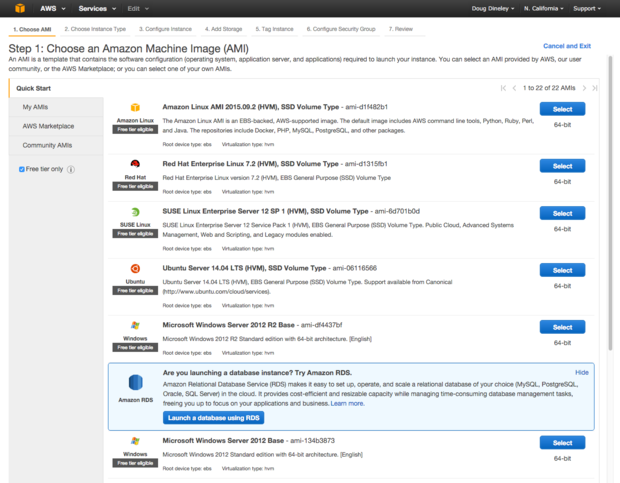
A broad range of machine instances is available for AWS. Click the check box in the sidebar to filter on images eligible for the free tier.
Storage. An EC2 instance isn’t much use without storage space. On the free tier you’re allowed 30GB of Elastic Block Storage, 5GB of Amazon S3 storage, and 50GB of outbound data transfer from Amazon CloudFront. However, note that Amazon limits I/O usage for each service, charging you when you exceed them. S3 allows 20,000 GET and 2,000 PUT requests. EBS allows 2 million I/Os. CloudFront allows 2 million requests.
I/O charges can end up as one of the biggest stealth costs. With EBS, for instance, Amazon has varying per-gigabyte and sometimes per-million-I/O-request charges, depending on which flavor of EBS you’re using. (We offer tips on managing I/O utilization below.)
Databases. Among Amazon’s Relational Database Services (RDS), you have your pick of MySQL/MariaDB, PostgreSQL, Oracle BYOL, or Microsoft SQL Server, each with 750 hours of usage per month, 20GB of storage, 10 million I/Os, and 20GB of backup storage.
For those who prefer NoSQL, Amazon offers DynamoDB, with 25GB of storage and 25 units of read and write capacity. Amazon’s ElastiCache and Redshift products are also available, each offering 750 hours of use on the free tier — albeit on specific machine types.
As with storage, estimating I/O for databases can be tricky, but more than enough is available to experiment with a low-traffic, database-driven site and not run into major overage.
Analytics. Amazon Elasticsearch can run for 750 hours on the free tier, with 10GB of optional EBS storage. AWS Data Pipeline provides three low-frequency preconditions and five low-frequency activities free each month on the free tier.
Mobile services. A number of freebies are available, but most striking is Amazon Simple Notification Service (SNS), which allows 1 million push deliveries, 100,000 HTTP/S deliveries, and 1,000 emails in the free tier. Best of all, these freebies don’t expire at the end of the free period. For Amazon Cognito, you get an unlimited number of user authentications and ID generations, and for Amazon Mobile Analytics, 100 million free events per month. Less generous is the AWS Device Farm; you get a one-time free trial of 250 device minutes.
Internet of things. Amazon’s free tier for its IoT services provides 250,000 messages, either published or delivered, per month for 12 months.
Developer tools. Those using GitHub for open source projects are by now accustomed to having little or no limit on storage or usage. AWS’s code tools on the free tier have limits, but they are relatively high: 50GB per month of storage and 10,000 Git requests per month. Unfortunately, AWS provides only one active CodePipeline per month and only five active CodeCommit users per month.
Management tools. Amazon CloudWatch provides a generous 1 million API requests, 5GB of log ingestion and archiving, and 10 custom metrics and 10 alarms for the duration of the free tier, plus three dashboards with up to 50 metrics each per month. AWS Trusted Advisor offers only four best-practice checks.
Key management. Up to 20,000 free requests per month can be made with Amazon’s encryption-key management service.
Application services. A number of freebies is available under this general umbrella:
- API Gateway: 1 million API calls per month. Useful as a front end for application creation services like AWS Lambda.
- AppStream: Windows applications can be delivered to any device, for up to 20 free hours per month.
- Elastic Transcoder: 20 minutes of audio and SD video transcoding, as well as 10 minutes of HD transcoding, are included per month.
- Simple Email Service: Amazon’s email services provide 62,000 outbound and 1,000 inbound messages per month.
- Simple Queue Service: The scalable queuing system provided by Amazon gives you 1 million requests during the free tier.
- Simple Workflow Service: The task coordination and state management service in Amazon’s cloud provides 10,000 Activity Tasks, 30,000 Workflow Days, and 1,000 Initiated Executions.
Data transfer. This part is easy. You get 15GB of outbound bandwidth across all of AWS, period. For perspective, my personal site with 5,000 visitors per month consumes about 1.2GB of bandwidth in that time. For a relatively simple — or nonpublic — website, 15GB should be more than enough.
Restrictions beyond the limits
Now the bad news: Amazon has attached a number of strings to the free tier. Aside from the usage limits outlined above, you should be aware of these other restrictions.
Core services are free for only 12 months. Most of the key AWS options — including EC2, S3, and RDS — are restricted to 12 months of free use after your initial sign-up. After that, it’s pay as you go at the usual rates. On the plus side, some of the other services — DynamoDB, Simple Workflow, Simple Queue Service, Simple Notification Service, Amazon Elastic Transcoder, and CloudWatch, among many — are still eligible for the free tier after the first year.
Expect your CPU (and bandwidth) to be throttled. Micro instances are designed to supply maximum CPU in intermittent bursts. They don’t supply a full, continuous instance of what Amazon calls a “compute unit” — you need to move up to the M1 Small instance for that. This makes a micro instance “well suited for lower throughput applications and websites that require additional compute cycles periodically,” per Amazon’s documentation.
If you run applications that occasionally spike the CPU at 100 percent, they should be fine. Apps that peg the CPU at 100 percent for long periods of time will run briefly at 100 percent, then they’re throttled. Note that the internal statistics for a throttled machine will still report the CPU as running at 100 percent, so don’t be fooled.

You can monitor usage statistics through Amazon’s EC2 Dashboard, but you’ll get better granularity of stats from inside the running machine.
Windows Server instances on the free tier may be a tight fit. Depending on what you plan to do, the amount of memory apportioned to a Windows Server instance may not be enough to run an ambitious project. If you’re doing no more than serving up static Web pages, it should be fine. Back when instances on the free tier provided only 613MB of RAM, I was able to install MySQL/Apache instances on such a machine (via the AMPPS Web stack) and run it with about 20 percent RAM free. With 1GB of RAM, you’ll likely do a little better, but you still won’t be able to run anything too industrious.
On the plus side, if you’re using a database via an AWS-hosted database instance (RDS), the database is launched entirely apart from the machine you’re running. With RDS, you don’t have to worry about running a database server on the EC2 instance you’re using (and thus gobbling up more memory with it).
You don’t get a consistent IP address by default. Because of the way AWS provisions addresses, instances do not come with a static IP address or a consistent private DNS name automatically. Thus, it’s tough to host a free site for use by the outside world without DNS trickery, as resetting the EC2 instance will cause its IP address to reset.
Fortunately, this limitation is easy to overcome. If you want a machine to be consistently reachable by the general public, you can use EC2 Elastic IP Addresses to provision a static IP for a free instance. Bear in mind that if you reserve an address and don’t associate it with an instance, you’ll be charged a small fee.
Best practices with the free tier
Clearly, the free tier has many gotchas. Because of resource limits, it’s too easy to run up charges if you’re not careful. As you strive to make the most of your micro instance, keep these guidelines in mind.
Keep an eye on your billing. It should go without saying, but regularly check your AWS account activity page to see if you’re running up charges. Amazon doesn’t warn you if you’ve exceeded the free tier; instead, you’re silently billed for any usage that isn’t covered. If you want to track your estimated usage or create alarms to warn you if you might exceed your budget, you need to look into Amazon’s billing alert system. However, the number of alarms and notifications you can generate is limited by the free tier.
Keep an eye on your I/O usage. If you’re using the server for yourself, you’re not likely to run up a big I/O usage bill. But if you make your server public, that could change everything — dramatically.
Figuring out I/O usage for your instances isn’t difficult, but it requires diligence and scrutiny. The EC2 management console provides monitoring tools, although the ones in the free tier aren’t as granular as the for-pay counterparts. You can’t poll a free instance at more than five-minute intervals, whereas you get one-minute polling with for-pay instances.
You can also poll I/O usage from within the instance, using the OS’s tools. Here’s one way to do it on Linux. In Windows you can use the Disk Transfers/Sec performance counter.

You can track your service charges through Amazon’s reporting system, which also allows you to download the gory details in CSV/XML formats.
Assign an elastic address to save yourself a headache. An elastic address doesn’t add a significant amount to your bill, and it allows for easier connections to your system. This goes double for Windows instances because the Remote Desktop connection tool stores the connection address and password together. Each time your site is provisioned with a new IP address, you have to create an entirely new Remote Desktop connection to reach it.
Back up items in the cloud. You never know when the server you’ll be working with may bomb or have to be reinitialized. It’s better to have pertinent data already in Amazon’s cloud instead of needing to be tediously reuploaded. An EBS Snapshot is one convenient way to do this, though you get only 1GB of snapshot storage on the free tier. Alternatively, you can attach an EBS volume and back up files directly to it, in the same manner you’d perform backups from a conventional system to an external drive. Note that you get 30GB of general-use EBS storage on the free tier, which is much more than you get for snapshots, but the backup and restore process is entirely manual.
Where from here?
Once you have the hang of AWS in the free tier, you’ll probably be itching to climb the Amazon food chain. The next steps up from the micro instances are the T2 Small, T2 Medium, and T2 Large instances, which provide 2GB to 8GB of memory and one or two of Amazon’s “virtual CPU” units. A T2 Small instance starts at around $18.72 a month.
If you’re a penny-pincher who doesn’t need a server running 24/7, consider a spot instance, wherein you bid for computing capacity by specifying a maximum price you’re willing to pay per hour. If the current price per hour for spot instances rises above that amount (rates fluctuate based on supply and demand), your instance will stop running.
Finally, if you want to run something sporadically, such as a backup server, check out the reserved instances. A reserve instance lets you pay a one-time fee for a fixed windows — one to three years — and obtain a significantly discounted hourly usage fee. As of this writing, a single T2 Small reserved instance on Linux can be had for $151 per year, plus an hourly rate of 2.6 cents — around $170 for the whole year assuming 100 percent utilization.
T2 Smalls, spot instances, and reserved instances — they’re all pretty affordable. And by the time you graduate from the free tier, you will have accumulated plenty of practice using Amazon’s tools and keeping your costs in line.

Spot instances let you run a machine on unused capacity by bidding for it. It’s a useful option to run a machine intermittently for little money.


