
An experimental ‘no-GIL’ build mode in Python 3.13 disables the Global Interpreter Lock to enable true parallel execution in Python. Here’s where to start.

The single biggest new feature in Python 3.13 is something Python users have anticipated for ages: a version of Python that allows full concurrency, or multi-threading, by removing the Global Interpreter Lock. Whether you call it “free-threaded” or “no-GIL” Python, the result is the same: a sea change in the way Python handles parallel execution of threads, taking full advantage of multi-core and multi-processor systems.
How do you actually use Python’s new free-threading features? In this article, we’ll walk through how Python 3.13 implements no-GIL mode, how you can use it in your programs now, and how things might change in future versions of Python. Also, check out my companion video below for a quick benchmark comparison of the no-GIL mode versus Python’s standard single-threaded version.
Installing Python 3.13’s free-threaded version
When Python’s free-threaded version was first announced, the plan wasn’t to immediately replace the GIL-equipped version of Python. Instead, Python users would have the option to install Python’s free-threaded build side-by-side with the regular version and select between them as needed—for example, by way of the py tool in Windows.
Binary releases of Python 3.13 for Microsoft Windows and macOS come with an option in the installer to set up the free-threaded build. If you select this option (as shown below), two Python executables are installed: python and python3.13t. The former is the regular build; the latter is the free-threaded build.
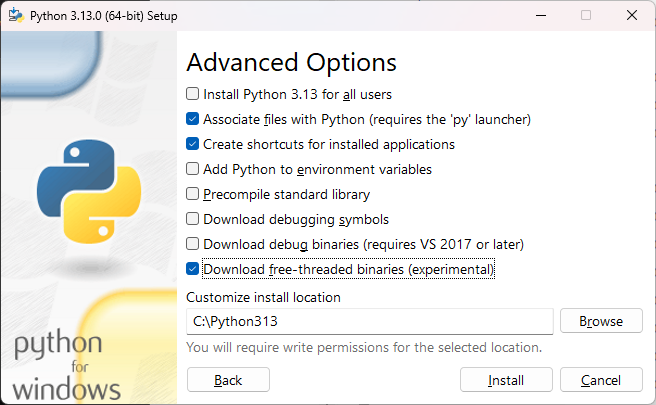
Python 3.13’s installer lets you install the free-threaded build of Python side-by-side with the regular build. You can use the “py” utility to select which one to use for a given program.
IDG
On Microsoft Windows, the py tool gives you the option to choose between different builds, just as you’d use it to choose between different version numbers of Python:
PS C:\Users\serda> py -0p
 -V:3.13t         C:\Python313\python3.13t.exe
 -V:3.13          C:\Python313\python.exe
 -V:3.12 *        C:\Python312\python.exe
 -V:3.11          C:\Python311\python.exe
If you run py -3.13, you’ll run the default build:
Python 3.13.0 (tags/v3.13.0:60403a5, Oct 7 2024, 09:38:07) [MSC v.1941 64 bit (AMD64)] on win32Run py -3.13t, and you’ll launch the free-threaded build:
Python 3.13.0 experimental free-threading build (tags/v3.13.0:60403a5, Oct 7 2024, 09:53:29) [MSC v.1941 64 bit (AMD64)] on win32
On Linux, the most convenient way to use multiple versions of Python generally is pyenv. A 3.13t or 3.13t-dev option for pyenv lets you install and select that build. (Ubuntu users can also work with the deadsnakes PPA to obtain these builds.)
When you use the free-threaded build, the GIL is included in the binary but disabled by default. If for some reason you want to re-enable the GIL in the free-threaded version, you can use the command-line option -X gil=1, or set the environment variable PYTHON_GIL to 1.
Using free-threaded Python in your programs
If your Python program already uses threading by way of a high-level abstraction like a ThreadPool, you don’t have to change anything. Existing programs that use threads through the CPython APIs run as-is.
Here’s an example of a simple program that requires no modification:
import time
from concurrent.futures import ThreadPoolExecutor as TP

def task():
    n = 0
    for x in range(10_000_000):
        n+=x
    return n

with TP() as pool:
    start = time.perf_counter()
    results = [pool.submit(task) for _ in range(6)]

print("Elapsed time:", time.perf_counter() - start)
print ([r.result() for r in results])
All threading is handled automatically through the high-level constructs in concurrent.futures.
Try running this program with Python 3.12 or Python 3.13 (the GIL version). On my AMD Ryzen 3600 six-core machine, it completes in about two seconds. With Python 3.13t, it completes in about 0.6 seconds—about a three-fold speedup. The magnitude of the speedup and how linearly the operations scale will vary depending on the task, but the difference should be most noticeable for CPU-bound operations.
Note that most existing Python programs aren’t using threading for CPU-bound operations. They typically use multiprocessing, or the ProcessPoolExecutor abstraction. A version of the above program designed to run well with the GIL would look like this:
import time
from concurrent.futures import ProcessPoolExecutor as PP

def task():
    n = 0
    for x in range(10_000_000):
        n+=x
    return n

def main():
    with PP() as pool:
        start = time.perf_counter()
        results = [pool.submit(task) for _ in range(6)]

    print("Elapsed time:", time.perf_counter() - start)
    print ([r.result() for r in results])

if __name__ == "__main__":
    main()
Apart from using a process pool, and having a main() function as an entry point to the main process (for the sake of running properly on Microsoft Windows), it’s the same program.
To that end, any program with ThreadPoolExecutor ought to work in no-GIL mode by simply swapping in ProcessPoolExecutor. What’s more, you can do this incrementally— ProcessPoolExecutor still works exactly as-is on Python 3.13t.
How much of a speed boost can you expect? Ultimately it will depend on the nature of the workload and the number of available CPU cores, but it can be quite significant. Using a simple CPU-intensive benchmark, I saw a 5x increase on my AMD Ryzen system with six cores and 12 threads. For details, see the video below.
Checking programmatically for GIL support
If you want a Python program that detects the presence of the GIL and takes action based on that information, you can write that in a couple of lines:
import sys
try:
    GIL_ENABLED = sys._is_gil_enabled()
except AttributeError:
    GIL_ENABLED = True
sys._is_gil_enabled(), added in Python 3.13, reports whether or not the GIL is enabled at runtime. It isn’t found on older Python versions, hence our try/except block.
Using free-threaded Python with C extensions
While “pure” Python programs don’t need much (if any) reworking to use free-threading, C extensions are another story. Any C extensions intended to work specifically with the free-threaded Python builds must be recompiled with support explicitly added for that build.
If a given C extension isn’t marked as being free-threaded compatible, the CPython interpreter will automatically enable the GIL unless you used the -X gil=0 option or PYTHON_GIL environment variable to disable it. This is also why it can be useful to programmatically check if the GIL is enabled, so that you can, for instance, decide which version of a module to load.
If you’re using Cython to create C extensions, support for free-threaded Python is already being added, but it won’t be available until Cython 3.1 is released. Once that happens, though, you’ll be able to use the directive freethreading_compatible=True to indicate a module is compatible with the free-threaded build.
Cython uses the with gil: and with nogil: context managers to mark segments of code that require or run outside the GIL, respectively. If you build Cython modules with free-threading enabled, those context managers effectively get optimized out of the compiled code. In other words, you can continue to use them as needed for code that needs to compile for both GIL-based and free-threaded Python builds. We’ll likely need to keep doing that for a while to come.


