
Have you ever wished you could generate interactive websites with HTML, CSS, and JavaScript while programming in nothing but Python? Here are three frameworks that do the trick.

Python has long had a presence as a language for server-side frameworks, with support for most every project size or use case. But it’s historically been confined to the back end—there’s no real culture of writing Python for creating front-end, client-side code. At least not yet.
Recently, some projects have tried to transpile Python to JavaScript on the front end, or run Python on the front end via WebAssembly. There’s promise in the idea, but the way it’s currently implemented is clunky and primordial. Maybe there’s a better option out there?
Sure enough, there is. An emerging family of Python web frameworks let you write declarative Python code on the back end that programmatically generates front-end code. You can use Python objects to describe HTML entities and their JavaScript-powered behaviors, then let the framework generate those objects for you when they’re served to the client.
We’ll look at three Python web frameworks that follow this paradigm, allowing you to describe front-end code (HTML, CSS, and JavaScript) using back-end Python code. The front-end objects are represented through the Python object model.
Anvil
Anvil‘s big pitch is “Build web apps with nothing but Python” (emphasis theirs). With Anvil, one writes Python code—or uses Anvil’s drag-and-drop low-code tools—and out comes a full-blown web application with an interactive, JavaScript-powered front end and a Python-powered back end.
Anvil offers two basic approaches. One is the Anvil cloud service, which comes in a range of pricing tiers and offers visual build tools and various hosting options. The other is the open source Anvil runtime, which doesn’t include the visual designer but still lets you build and run Anvil applications with hand-written code.
Anvil applications consist of three components: the UI, which can either be designed with Anvil’s design tools or expressed through hand-written code; the client-side code that’s transpiled from Python to JavaScript; and the server-side Python code. The Anvil cloud editor automatically generates back- and front-end code, in much the same manner as tools like Qt Design Studio.
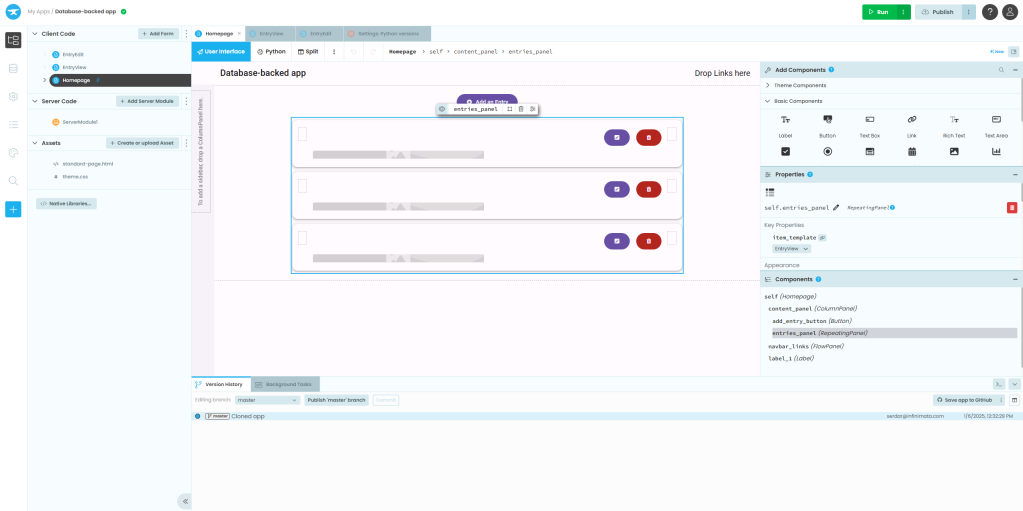
Anvil’s cloud incarnation provides a powerful visual design tool for your UIs. Once it’s generated, you can re-use the code without the designer.
IDG
The Anvil cloud editor comes with a few included examples, such as a basic static application with no back-end code, a simple ticketing system, or a full-blown online store. Each can be used as a template for your own project. You also get a useful selection of prebuilt UI components to wire into web pages. One handy component is a timer for executing code at intervals—e.g., for polling a data source for updates. You can also hand-roll your own HTML and custom components. Data sources can also be added in the cloud and wired to components, so you can put together common CRUD apps very quickly.
If you elect to use the Anvil runtime, you can write applications by hand and use one of a few prebuilt templates as a starting point. Changes to the code are reflected immediately on the application server, making for a fast development cycle. User interface elements are essentially Python class instances, with event handlers added via class methods. It’s also easy to programmatically add behaviors by way of well-thought-out general methods. For instance, if you want to raise an event with an object’s children, you don’t need to loop through the children to do it; you can simply use a raise_event_on_children method on the container object.
By default, all the JavaScript for an Anvil site is generated automatically, but you can write your own JavaScript as needed. Note, though, that Anvil loads some JavaScript of its own that might conflict with the code you write. What’s more, some of Anvil’s own dependencies are somewhat dated—Bootstrap 3, for instance. You can work around it by creating a custom theme, which is not a trivial amount of work.
Reflex
Reflex (formerly Pynecone) doesn’t include the design tooling found in Anvil, but it has the same underlying idea: You use Python code both to write the back end of your web stack and to programmatically generate the front end without needing to write JavaScript.
Reflex’s earlier incarnation used both Python and the long-term support version of the Node.js runtime. Reflex needs nothing more than Python 3.8 or better, and works on Linux and Windows, although Windows users are advised to use WSL for the best performance. Once you get things set up, you can use the provided reflex command to set up a new Reflex project and get it running.
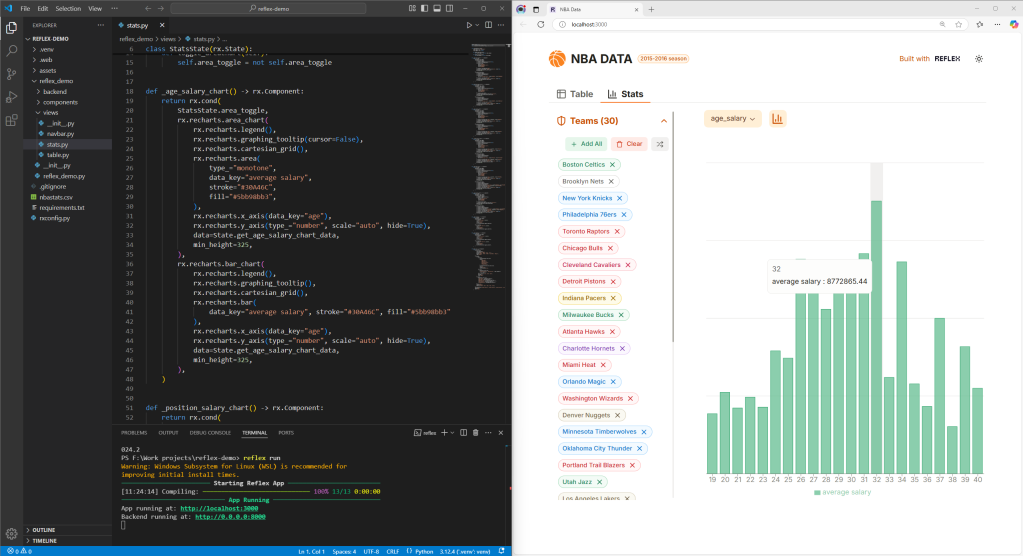
A sample Reflex web app created in pure Python. The interactive chart is one example of many such widgets bundled with Reflex.
IDG
The front end of a Reflex app compiles to a React application, with FastAPI to serve the Python back end. Many common components come built-in—not just things like text layouts or form handling, but data display objects like plots or charts, feedback controls like alerts and progress bars, and overlay objects like modals and tooltips. You can also wrap custom-built React components. For connecting to data sources, React includes a data layer that wraps the well-known SQLAlchemy ORM.
If you want to customize a UI component, most common customizations, like CSS styling, can be passed as arguments to the object constructor, rather than subclassing a component and modifying it that way. For everything else, there’s custom HTML, but some combination of the built-ins and their options should suffice for the vast majority of common projects.
Finally, if you build chiefly static sites, Reflex has the handy ability to export an entire site’s front end to a static build. This makes Reflex useful as a programmatic site generator tool, as well.
NiceGUI
Picture this: You’ve got an existing Python app that runs as a command-line application or web service, but you want to add a web-based UI to it—and fast. You could try cobbling together a front end on your own, but why reinvent that wheel when NiceGUI has already done it for you?
NiceGUI uses a declarative syntax to describe what your UI components look like and how they behave. The gallery of prebuilt UI components includes many common widgets—buttons, sliders, text labels, input boxes, file uploaders, and so on. But they also include components for more sophisticated applications, like audio or video, interactive data presentations (charts, tables, Matplotlib figure rendering), 3D visualizations using three.js, CodeMirror editors, and much more. None of these components require you to write any in-browser code at all; NiceGUI handles all of that.
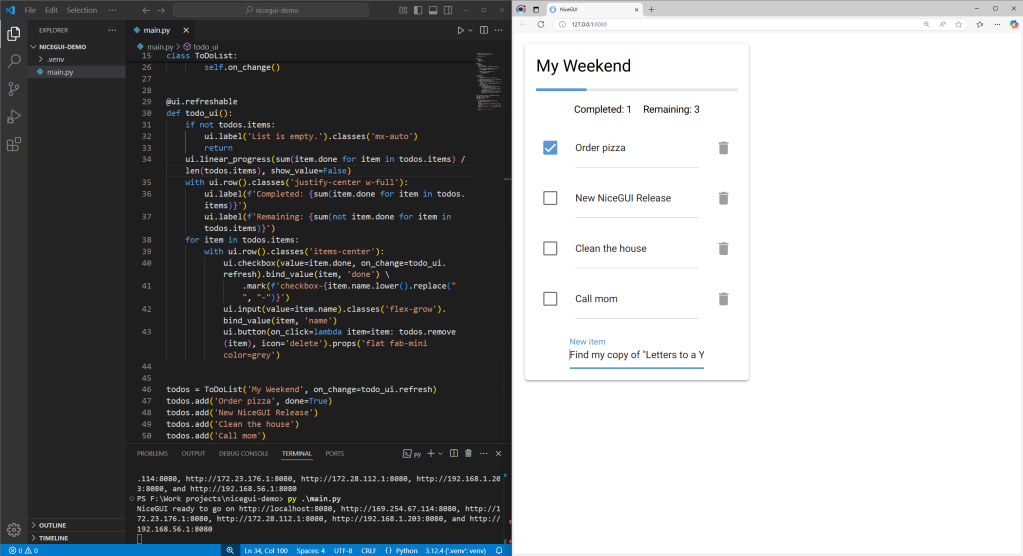
A simple NiceGUI app, with web widgets created programmatically. The resulting app can be deployed on a server or as a standalone program.
IDG
Wrapping existing code with NiceGUI requires learning a little about how NiceGUI handles things like event loops and application state. The good news is all of those things are done by way of high-level constructs in NiceGUI itself. For instance, the ui.timer object lets you quickly define some code to run on a regular interval, or to call once. ui.clipboard and app.storage deal with the browser’s clipboard and local storage mechanisms. And long-running tasks can be easily delegated to a subprocess with run.cpu_bound or to a thread with run.io_bound.
NiceGUI uses FastAPI as its internal web framework, so hosting NiceGUI apps follows many of the same patterns as setting up a FastAPI app. You can also use a prebuilt Docker image as the basis for creating a Dockerized version of a NiceGUI app, or bundle your app as a standalone executable for easy redistribution.
Conclusion
Anvil’s big draw is its low- and no-code interactive UI creation tools. Reflex is convenient if you want to work with a React front end and render generated sites to static HTML. And NiceGUI offers many high-level, declarative abstractions for quickly creating apps, including event handling. All three are solid frameworks that let you write Python code to describe HTML entities and their JavaScript-enabled behaviors.


